


JAVA language provides a Class called Scanner that is used for reading data from different sources.
Here KEYBOARD is a source.
So, How to read data from the keyboard?
We have a Scanner class that is present in the UTIL package of Java.
Now, We have some methods that are necessary to read the Scanner and there are different methods as following:
nextInt( ) nextFloat( ) nextDouble( ) next( ) nextLine( ) nextByte( ) nextShort( ) nextLong( ) nextBoolean( ) hasNextInt( ) hasNextFloat( )
The selection of the method depends on the type of information or data you required from a user.
For example:
- If you are requesting the age of a person, then you require a number from the user. The number is an Integer type and hence, you will call the method nextInt( ) to read the numbers from the keyboard.
- If you request a single word from the user, then use next( ).
- If you request a collection of words or lines, then use nextLine( ).
Let's see How to use the Scanner class with a example:
Step 1: Create Object
Scanner sc = new Scanner(System.in);
Here, Scanner(left) is a class name. Sc is a reference. new Scanner is a constructor. System. in is an object associated with the Keyboard.
Example: Add any two numbers.
Step 2: Declare variables.
int a,b,c;
Step 3: Give the message to the system that you want to take some number from the keyboard.
System.out.println("Enter two numbers");
Step 4: For reading a number, we need to call out a method and store a value in a variable.
a = s.nextInt( );
b = s.nextInt( );
c= a+b;
Since the type of data is an Integer, we use the method nextInt( );
Once we call this [nextInt( );] method, It will read integer numbers from the keyboard.
Basically, s.nextInt( ); will get Integer from the keyboard and store in variable a and b.
Step 5: Print the result
System.out.println("Sum is " + c);
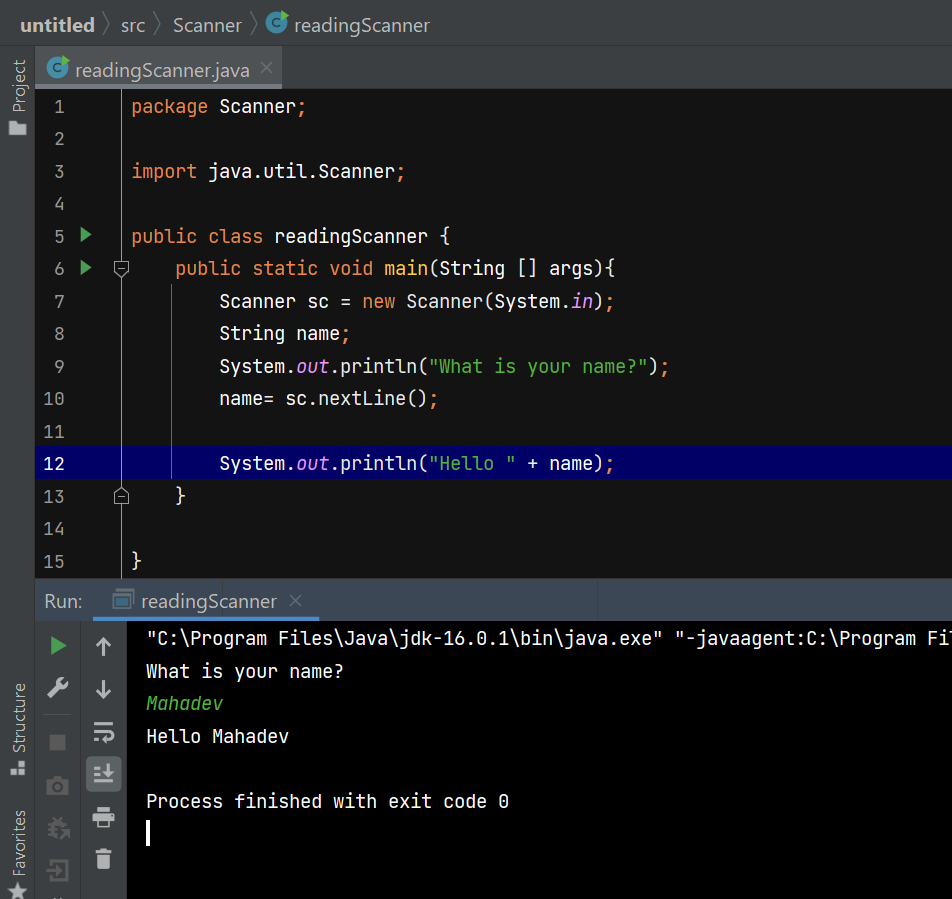
Example 2: Take the name of a person as input and give the Welcome message as Output.
Important: What is a use of hasNextInt( ) and hasNextFloat?
Answer: This method is use to check if the data is an integer/float type or not before reading.
Reminder: System.out.println("Hello" + c); prints "HelloMahadev" and hence it is WRONG. System.out.println("Hello " + c); prints "Hello Mahadev" and hence it is RIGHT.